 AI 智链谷
 问苏一二 ↗
社区交流 ·
使用 MCP 入门
开源教程转载|使用 MCP 入门。Microsoft 及项目贡献者编写,智链谷平台运营整理。
> 开源教程转载 · 由智链谷平台运营账号整理发布。作者:Microsoft 及项目贡献者。
> [查看原文](https://github.com/microsoft/mcp-for-beginners/blob/2f43408b764326df5fc928984c6dd7db2b8fb63e/translations/zh-CN/03-GettingStarted/01-first-server/README.md) · MIT 许可,完整声明见文末。
# 使用 MCP 入门
欢迎开始使用模型上下文协议(Model Context Protocol,MCP)!无论您是 MCP 新手还是希望加深理解,本指南将引导您完成基本的设置和开发流程。您将了解 MCP 如何实现 AI 模型与应用程序之间的无缝集成,并学习如何快速准备环境以构建和测试基于 MCP 的解决方案。
> 简而言之;如果您构建 AI 应用程序,就知道可以向您的大语言模型(LLM)添加工具和其他资源,以使 LLM 更加智能。然而,如果您将这些工具和资源放在服务器上,应用程序和服务器功能可以被任何带有或不带 LLM 的客户端使用。
## 概述
本课程提供设置 MCP 环境和构建首个 MCP 应用程序的实用指导。您将学习如何准备必要的工具和框架,构建基本 MCP 服务器,创建宿主应用程序,并测试您的实现。
模型上下文协议(MCP)是一种开放协议,标准化了应用程序向大语言模型提供上下文的方式。可以把 MCP 想象成 AI 应用程序的 USB-C 端口——提供一种标准化方式,将 AI 模型连接到不同数据源和工具。
## 学习目标
完成本课后,您将能够:
- 为 C#、Java、Python、TypeScript 和 Rust 设置 MCP 开发环境
- 构建并部署带有自定义功能(资源、提示和工具)的基础 MCP 服务器
- 创建连接到 MCP 服务器的宿主应用程序
- 测试和调试 MCP 实现
## 设置 MCP 环境
开始使用 MCP 前,准备好您的开发环境并理解基本工作流程非常重要。本节将指导您完成初始设置步骤,确保 MCP 之旅顺利开始。
### 前提条件
开始 MCP 开发前,请确保您具备:
- <strong>开发环境</strong>:对应您选择的语言(C#、Java、Python、TypeScript 或 Rust)
- **IDE/编辑器**:Visual Studio、Visual Studio Code、IntelliJ、Eclipse、PyCharm 或任何现代代码编辑器
- <strong>包管理器</strong>:NuGet、Maven/Gradle、pip、npm/yarn 或 Cargo
- **API 密钥**:用于您宿主应用计划调用的任何 AI 服务
## 基础 MCP 服务器结构
一个 MCP 服务器通常包括:
- <strong>服务器配置</strong>:设置端口、认证及其他参数
- <strong>资源</strong>:提供给 LLM 的数据和上下文
- <strong>工具</strong>:模型可以调用的功能
- <strong>提示</strong>:生成或结构化文本的模板
以下是 TypeScript 中的简化示例:
```typescript
import { McpServer, ResourceTemplate } from "@modelcontextprotocol/sdk/server/mcp.js";
import { StdioServerTransport } from "@modelcontextprotocol/sdk/server/stdio.js";
import { z } from "zod";
// 创建一个 MCP 服务器
const server = new McpServer({
name: "Demo",
version: "1.0.0"
});
// 添加一个附加工具
server.tool("add",
{ a: z.number(), b: z.number() },
async ({ a, b }) => ({
content: [{ type: "text", text: String(a + b) }]
})
);
// 添加一个动态问候资源
server.resource(
"file",
// 'list' 参数控制资源如何列出可用文件。将其设置为 undefined 会禁用此资源的文件列表功能。
new ResourceTemplate("file://{path}", { list: undefined }),
async (uri, { path }) => ({
contents: [{
uri: uri.href,
text: `File, ${path}!`
}]
})
);
// 添加一个读取文件内容的文件资源
server.resource(
"file",
new ResourceTemplate("file://{path}", { list: undefined }),
async (uri, { path }) => {
let text;
try {
text = await fs.readFile(path, "utf8");
} catch (err) {
text = `Error reading file: ${err.message}`;
}
return {
contents: [{
uri: uri.href,
text
}]
};
}
);
server.prompt(
"review-code",
{ code: z.string() },
({ code }) => ({
messages: [{
role: "user",
content: {
type: "text",
text: `Please review this code:\n\n${code}`
}
}]
})
);
// 开始在标准输入接收消息并在标准输出发送消息
const transport = new StdioServerTransport();
await server.connect(transport);
```
在上述代码中,我们:
- 从 MCP TypeScript SDK 中导入必要的类。
- 创建并配置新的 MCP 服务器实例。
- 注册了一个自定义工具(`calculator`)及其处理函数。
- 启动服务器,监听传入的 MCP 请求。
## 测试与调试
开始测试 MCP 服务器之前,了解可用的工具和调试最佳实践非常关键。有效测试确保服务器按照预期运行,帮助您快速定位和解决问题。以下部分概述了验证 MCP 实现的推荐做法。
MCP 提供多种工具帮助您测试和调试服务器:
- **Inspector 工具**:该图形界面允许您连接服务器并测试工具、提示和资源。
- **curl**:您也可以使用命令行工具如 curl 或其他可创建和执行 HTTP 请求的客户端连接服务器。
### 使用 MCP Inspector
[MCP Inspector](https://github.com/modelcontextprotocol/inspector) 是一款可视化测试工具,帮助您:
1. <strong>发现服务器功能</strong>:自动检测可用的资源、工具和提示
2. <strong>测试工具执行</strong>:尝试不同参数并实时查看响应
3. <strong>查看服务器元数据</strong>:检查服务器信息、模式和配置
```bash
# 例如 TypeScript,安装和运行 MCP Inspector
npx @modelcontextprotocol/inspector node build/index.js
```
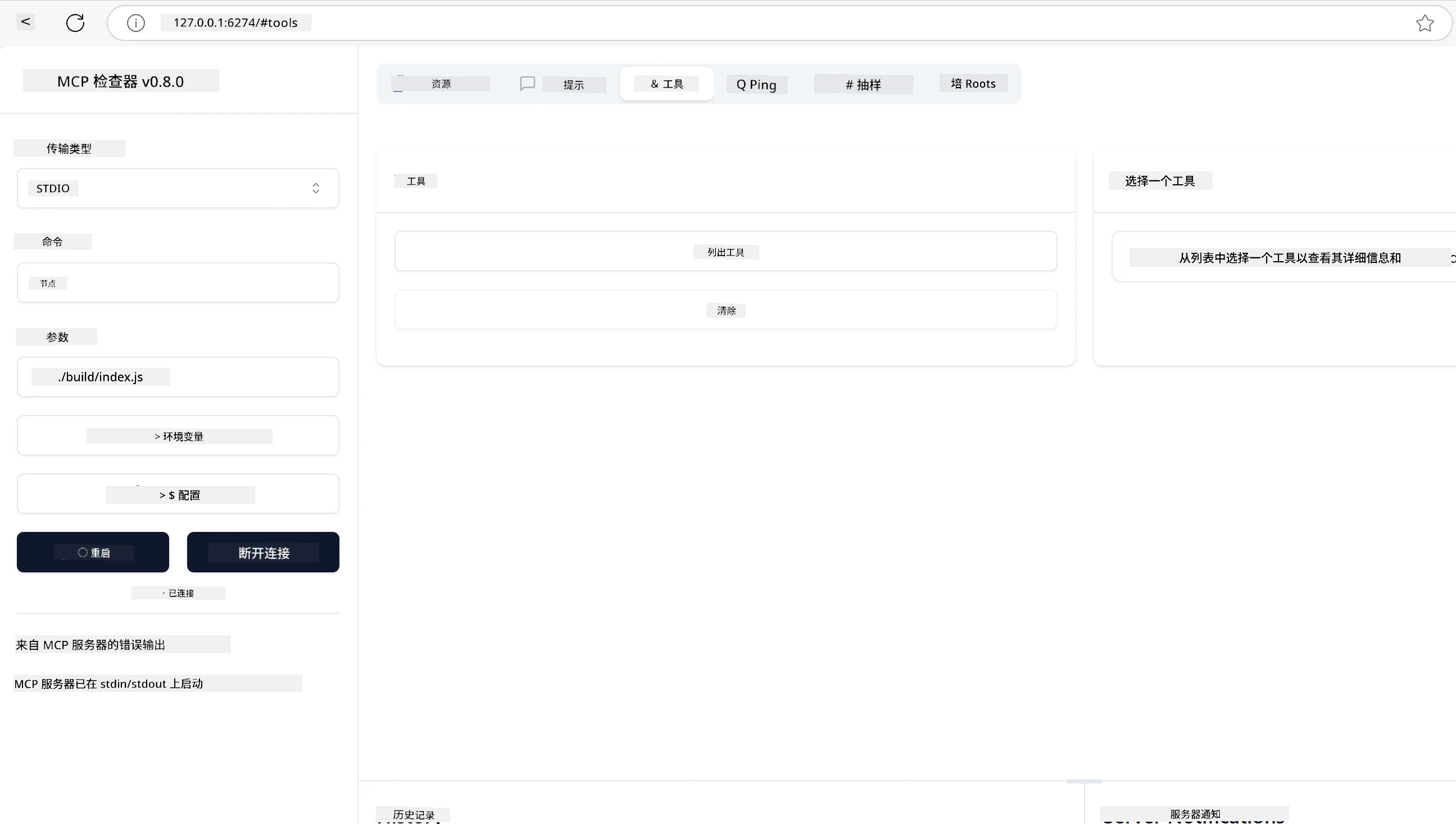
当您运行上述命令时,MCP Inspector 会在浏览器中启动本地网页界面。您将看到显示已注册 MCP 服务器、其可用工具、资源和提示的仪表盘。该界面允许您交互式测试工具执行、检查服务器元数据并查看实时响应,从而更轻松地验证和调试 MCP 服务器实现。
示例如下截图所示:
## 常见设置问题及解决方案
| 问题 | 可能解决方案 |
|-------|-------------------|
| 连接被拒绝 | 检查服务器是否运行且端口正确 |
| 工具执行错误 | 检查参数验证和错误处理 |
| 认证失败 | 验证 API 密钥和权限 |
| 模式验证错误 | 确保参数与定义的模式匹配 |
| 服务器无法启动 | 检查端口冲突或缺少依赖 |
| 跨域资源共享 (CORS) 错误 | 配置正确的 CORS 头以支持跨域请求 |
| 身份验证问题 | 验证令牌有效性和权限 |
## 本地开发
在本地开发和测试时,您可以直接在本机运行 MCP 服务器:
1. <strong>启动服务器进程</strong>:运行您的 MCP 服务器应用
2. <strong>配置网络</strong>:确保服务器可通过预期端口访问
3. <strong>连接客户端</strong>:使用本地连接 URL,如 `http://localhost:3000`
```bash
# 示例:本地运行 TypeScript MCP 服务器
npm run start
# 服务器运行在 http://localhost:3000
```
## 构建您的第一个 MCP 服务器
我们在之前的课程已介绍了[核心概念](https://github.com/microsoft/mcp-for-beginners/blob/2f43408b764326df5fc928984c6dd7db2b8fb63e/translations/zh-CN/01-CoreConcepts/README.md),现在是应用这些知识的时候了。
### 服务器能做什么
在开始编码前,让我们回顾一下服务器能做的事情:
MCP 服务器例如可以:
- 访问本地文件和数据库
- 连接远程 API
- 执行计算
- 与其他工具和服务集成
- 提供用户交互界面
很好,知道了服务器能做什么后,我们开始写代码吧。
## 练习:创建服务器
创建服务器需要按照以下步骤:
- 安装 MCP SDK。
- 创建项目并设置项目结构。
- 编写服务器代码。
- 测试服务器。
### -1- 创建项目
#### TypeScript
```sh
# 创建项目目录并初始化 npm 项目
mkdir calculator-server
cd calculator-server
npm init -y
```
#### Python
```sh
# 创建项目目录
mkdir calculator-server
cd calculator-server
# 在 Visual Studio Code 中打开文件夹 - 如果你使用的是其他 IDE,请跳过此步骤
code .
```
#### .NET
```sh
dotnet new console -n McpCalculatorServer
cd McpCalculatorServer
```
#### Java
对于 Java,创建 Spring Boot 项目:
```bash
curl https://start.spring.io/starter.zip \
-d dependencies=web \
-d javaVersion=21 \
-d type=maven-project \
-d groupId=com.example \
-d artifactId=calculator-server \
-d name=McpServer \
-d packageName=com.microsoft.mcp.sample.server \
-o calculator-server.zip
```
解压 zip 文件:
```bash
unzip calculator-server.zip -d calculator-server
cd calculator-server
# 可选删除未使用的测试
rm -rf src/test/java
```
将以下完整配置添加到您的 *pom.xml* 文件中:
```xml
<?xml version="1.0" encoding="UTF-8"?>
<project xmlns="http://maven.apache.org/POM/4.0.0"
xmlns:xsi="http://www.w3.org/2001/XMLSchema-instance"
xsi:schemaLocation="http://maven.apache.org/POM/4.0.0 http://maven.apache.org/xsd/maven-4.0.0.xsd">
<modelVersion>4.0.0</modelVersion>
<!-- Spring Boot parent for dependency management -->
<parent>
<groupId>org.springframework.boot</groupId>
<artifactId>spring-boot-starter-parent</artifactId>
<version>3.5.0</version>
<relativePath />
</parent>
<!-- Project coordinates -->
<groupId>com.example</groupId>
<artifactId>calculator-server</artifactId>
<version>0.0.1-SNAPSHOT</version>
<name>Calculator Server</name>
<description>Basic calculator MCP service for beginners</description>
<!-- Properties -->
<properties>
<java.version>21</java.version>
<maven.compiler.source>21</maven.compiler.source>
<maven.compiler.target>21</maven.compiler.target>
</properties>
<!-- Spring AI BOM for version management -->
<dependencyManagement>
<dependencies>
<dependency>
<groupId>org.springframework.ai</groupId>
<artifactId>spring-ai-bom</artifactId>
<version>1.0.0-SNAPSHOT</version>
<type>pom</type>
<scope>import</scope>
</dependency>
</dependencies>
</dependencyManagement>
<!-- Dependencies -->
<dependencies>
<dependency>
<groupId>org.springframework.ai</groupId>
<artifactId>spring-ai-starter-mcp-server-webflux</artifactId>
</dependency>
<dependency>
<groupId>org.springframework.boot</groupId>
<artifactId>spring-boot-starter-actuator</artifactId>
</dependency>
<dependency>
<groupId>org.springframework.boot</groupId>
<artifactId>spring-boot-starter-test</artifactId>
<scope>test</scope>
</dependency>
</dependencies>
<!-- Build configuration -->
<build>
<plugins>
<plugin>
<groupId>org.springframework.boot</groupId>
<artifactId>spring-boot-maven-plugin</artifactId>
</plugin>
<plugin>
<groupId>org.apache.maven.plugins</groupId>
<artifactId>maven-compiler-plugin</artifactId>
<configuration>
<release>21</release>
</configuration>
</plugin>
</plugins>
</build>
<!-- Repositories for Spring AI snapshots -->
<repositories>
<repository>
<id>spring-milestones</id>
<name>Spring Milestones</name>
<url>https://repo.spring.io/milestone</url>
<snapshots>
<enabled>false</enabled>
</snapshots>
</repository>
<repository>
<id>spring-snapshots</id>
<name>Spring Snapshots</name>
<url>https://repo.spring.io/snapshot</url>
<releases>
<enabled>false</enabled>
</releases>
</repository>
</repositories>
</project>
```
#### Rust
```sh
mkdir calculator-server
cd calculator-server
cargo init
```
### -2- 添加依赖
项目创建完成后,接下来添加依赖:
#### TypeScript
```sh
# 如果尚未安装,请全局安装 TypeScript
npm install typescript -g
# 安装 MCP SDK 和 Zod 进行模式验证
npm install @modelcontextprotocol/sdk zod
npm install -D @types/node typescript
```
#### Python
```sh
# 创建一个虚拟环境并安装依赖项
python -m venv venv
venv\Scripts\activate
pip install "mcp[cli]"
```
#### Java
```bash
cd calculator-server
./mvnw clean install -DskipTests
```
#### Rust
```sh
cargo add rmcp --features server,transport-io
cargo add serde
cargo add tokio --features rt-multi-thread
```
### -3- 创建项目文件
#### TypeScript
打开 *package.json* 文件,替换内容如下,确保能够构建和运行服务器:
```json
{
"name": "calculator-server",
"version": "1.0.0",
"main": "index.js",
"type": "module",
"scripts": {
"build": "tsc",
"start": "npm run build && node ./build/index.js",
},
"keywords": [],
"author": "",
"license": "ISC",
"description": "A simple calculator server using Model Context Protocol",
"dependencies": {
"@modelcontextprotocol/sdk": "^1.16.0",
"zod": "^3.25.76"
},
"devDependencies": {
"@types/node": "^24.0.14",
"typescript": "^5.8.3"
}
}
```
创建 *tsconfig.json*,内容如下:
```json
{
"compilerOptions": {
"target": "ES2022",
"module": "Node16",
"moduleResolution": "Node16",
"outDir": "./build",
"rootDir": "./src",
"strict": true,
"esModuleInterop": true,
"skipLibCheck": true,
"forceConsistentCasingInFileNames": true
},
"include": ["src/**/*"],
"exclude": ["node_modules"]
}
```
创建源码目录:
```sh
mkdir src
touch src/index.ts
```
#### Python
创建文件 *server.py*
```sh
touch server.py
```
#### .NET
安装所需的 NuGet 包:
```sh
dotnet add package ModelContextProtocol --prerelease
dotnet add package Microsoft.Extensions.Hosting
```
#### Java
Java Spring Boot 项目会自动创建项目结构。
#### Rust
运行 `cargo init` 时,会默认创建 *src/main.rs* 文件。打开该文件并删除默认代码。
### -4- 编写服务器代码
#### TypeScript
创建文件 *index.ts* 并添加以下代码:
```typescript
import { McpServer, ResourceTemplate } from "@modelcontextprotocol/sdk/server/mcp.js";
import { StdioServerTransport } from "@modelcontextprotocol/sdk/server/stdio.js";
import { z } from "zod";
// 创建一个MCP服务器
const server = new McpServer({
name: "Calculator MCP Server",
version: "1.0.0"
});
```
现在您有了服务器,但功能有限,我们来完善它。
#### Python
```python
# server.py
from mcp.server.fastmcp import FastMCP
# 创建一个MCP服务器
mcp = FastMCP("Demo")
```
#### .NET
```csharp
using Microsoft.Extensions.DependencyInjection;
using Microsoft.Extensions.Hosting;
using Microsoft.Extensions.Logging;
using ModelContextProtocol.Server;
using System.ComponentModel;
var builder = Host.CreateApplicationBuilder(args);
builder.Logging.AddConsole(consoleLogOptions =>
{
// Configure all logs to go to stderr
consoleLogOptions.LogToStandardErrorThreshold = LogLevel.Trace;
});
builder.Services
.AddMcpServer()
.WithStdioServerTransport()
.WithToolsFromAssembly();
await builder.Build().RunAsync();
// add features
```
#### Java
对于 Java,创建核心服务器组件。首先,修改主应用类:
*src/main/java/com/microsoft/mcp/sample/server/McpServerApplication.java*:
```java
package com.microsoft.mcp.sample.server;
import org.springframework.ai.tool.ToolCallbackProvider;
import org.springframework.ai.tool.method.MethodToolCallbackProvider;
import org.springframework.boot.SpringApplication;
import org.springframework.boot.autoconfigure.SpringBootApplication;
import org.springframework.context.annotation.Bean;
import com.microsoft.mcp.sample.server.service.CalculatorService;
@SpringBootApplication
public class McpServerApplication {
public static void main(String[] args) {
SpringApplication.run(McpServerApplication.class, args);
}
@Bean
public ToolCallbackProvider calculatorTools(CalculatorService calculator) {
return MethodToolCallbackProvider.builder().toolObjects(calculator).build();
}
}
```
创建计算器服务 *src/main/java/com/microsoft/mcp/sample/server/service/CalculatorService.java*:
```java
package com.microsoft.mcp.sample.server.service;
import org.springframework.ai.tool.annotation.Tool;
import org.springframework.stereotype.Service;
/**
* Service for basic calculator operations.
* This service provides simple calculator functionality through MCP.
*/
@Service
public class CalculatorService {
/**
* Add two numbers
* @param a The first number
* @param b The second number
* @return The sum of the two numbers
*/
@Tool(description = "Add two numbers together")
public String add(double a, double b) {
double result = a + b;
return formatResult(a, "+", b, result);
}
/**
* Subtract one number from another
* @param a The number to subtract from
* @param b The number to subtract
* @return The result of the subtraction
*/
@Tool(description = "Subtract the second number from the first number")
public String subtract(double a, double b) {
double result = a - b;
return formatResult(a, "-", b, result);
}
/**
* Multiply two numbers
* @param a The first number
* @param b The second number
* @return The product of the two numbers
*/
@Tool(description = "Multiply two numbers together")
public String multiply(double a, double b) {
double result = a * b;
return formatResult(a, "*", b, result);
}
/**
* Divide one number by another
* @param a The numerator
* @param b The denominator
* @return The result of the division
*/
@Tool(description = "Divide the first number by the second number")
public String divide(double a, double b) {
if (b == 0) {
return "Error: Cannot divide by zero";
}
double result = a / b;
return formatResult(a, "/", b, result);
}
/**
* Calculate the power of a number
* @param base The base number
* @param exponent The exponent
* @return The result of raising the base to the exponent
*/
@Tool(description = "Calculate the power of a number (base raised to an exponent)")
public String power(double base, double exponent) {
double result = Math.pow(base, exponent);
return formatResult(base, "^", exponent, result);
}
/**
* Calculate the square root of a number
* @param number The number to find the square root of
* @return The square root of the number
*/
@Tool(description = "Calculate the square root of a number")
public String squareRoot(double number) {
if (number < 0) {
return "Error: Cannot calculate square root of a negative number";
}
double result = Math.sqrt(number);
return String.format("√%.2f = %.2f", number, result);
}
/**
* Calculate the modulus (remainder) of division
* @param a The dividend
* @param b The divisor
* @return The remainder of the division
*/
@Tool(description = "Calculate the remainder when one number is divided by another")
public String modulus(double a, double b) {
if (b == 0) {
return "Error: Cannot divide by zero";
}
double result = a % b;
return formatResult(a, "%", b, result);
}
/**
* Calculate the absolute value of a number
* @param number The number to find the absolute value of
* @return The absolute value of the number
*/
@Tool(description = "Calculate the absolute value of a number")
public String absolute(double number) {
double result = Math.abs(number);
return String.format("|%.2f| = %.2f", number, result);
}
/**
* Get help about available calculator operations
* @return Information about available operations
*/
@Tool(description = "Get help about available calculator operations")
public String help() {
return "Basic Calculator MCP Service\n\n" +
"Available operations:\n" +
"1. add(a, b) - Adds two numbers\n" +
"2. subtract(a, b) - Subtracts the second number from the first\n" +
"3. multiply(a, b) - Multiplies two numbers\n" +
"4. divide(a, b) - Divides the first number by the second\n" +
"5. power(base, exponent) - Raises a number to a power\n" +
"6. squareRoot(number) - Calculates the square root\n" +
"7. modulus(a, b) - Calculates the remainder of division\n" +
"8. absolute(number) - Calculates the absolute value\n\n" +
"Example usage: add(5, 3) will return 5 + 3 = 8";
}
/**
* Format the result of a calculation
*/
private String formatResult(double a, String operator, double b, double result) {
return String.format("%.2f %s %.2f = %.2f", a, operator, b, result);
}
}
```
**用于生产环境服务的可选组件:**
创建启动配置 *src/main/java/com/microsoft/mcp/sample/server/config/StartupConfig.java*:
```java
package com.microsoft.mcp.sample.server.config;
import org.springframework.boot.CommandLineRunner;
import org.springframework.context.annotation.Bean;
import org.springframework.context.annotation.Configuration;
@Configuration
public class StartupConfig {
@Bean
public CommandLineRunner startupInfo() {
return args -> {
System.out.println("\n" + "=".repeat(60));
System.out.println("Calculator MCP Server is starting...");
System.out.println("SSE endpoint: http://localhost:8080/sse");
System.out.println("Health check: http://localhost:8080/actuator/health");
System.out.println("=".repeat(60) + "\n");
};
}
}
```
创建健康检查控制器 *src/main/java/com/microsoft/mcp/sample/server/controller/HealthController.java*:
```java
package com.microsoft.mcp.sample.server.controller;
import org.springframework.http.ResponseEntity;
import org.springframework.web.bind.annotation.GetMapping;
import org.springframework.web.bind.annotation.RestController;
import java.time.LocalDateTime;
import java.util.HashMap;
import java.util.Map;
@RestController
public class HealthController {
@GetMapping("/health")
public ResponseEntity<Map<String, Object>> healthCheck() {
Map<String, Object> response = new HashMap<>();
response.put("status", "UP");
response.put("timestamp", LocalDateTime.now().toString());
response.put("service", "Calculator MCP Server");
return ResponseEntity.ok(response);
}
}
```
创建异常处理器 *src/main/java/com/microsoft/mcp/sample/server/exception/GlobalExceptionHandler.java*:
```java
package com.microsoft.mcp.sample.server.exception;
import org.springframework.http.HttpStatus;
import org.springframework.http.ResponseEntity;
import org.springframework.web.bind.annotation.ExceptionHandler;
import org.springframework.web.bind.annotation.RestControllerAdvice;
@RestControllerAdvice
public class GlobalExceptionHandler {
@ExceptionHandler(IllegalArgumentException.class)
public ResponseEntity<ErrorResponse> handleIllegalArgumentException(IllegalArgumentException ex) {
ErrorResponse error = new ErrorResponse(
"Invalid_Input",
"Invalid input parameter: " + ex.getMessage());
return new ResponseEntity<>(error, HttpStatus.BAD_REQUEST);
}
public static class ErrorResponse {
private String code;
private String message;
public ErrorResponse(String code, String message) {
this.code = code;
this.message = message;
}
// 获取器
public String getCode() { return code; }
public String getMessage() { return message; }
}
}
```
创建自定义启动横幅 *src/main/resources/banner.txt*:
```text
_____ _ _ _
/ ____| | | | | | |
| | __ _| | ___ _ _| | __ _| |_ ___ _ __
| | / _` | |/ __| | | | |/ _` | __/ _ \| '__|
| |___| (_| | | (__| |_| | | (_| | || (_) | |
\_____\__,_|_|\___|\__,_|_|\__,_|\__\___/|_|
Calculator MCP Server v1.0
Spring Boot MCP Application
```
</details>
#### Rust
将以下代码添加到 *src/main.rs* 顶部。此代码导入 MCP 服务器所需的库和模块。
```rust
use rmcp::{
handler::server::{router::tool::ToolRouter, tool::Parameters},
model::{ServerCapabilities, ServerInfo},
schemars, tool, tool_handler, tool_router,
transport::stdio,
ServerHandler, ServiceExt,
};
use std::error::Error;
```
计算器服务器将是一个简单的示例,可以将两个数字相加。我们先创建一个用于表示计算器请求的结构体。
```rust
#[derive(Debug, serde::Deserialize, schemars::JsonSchema)]
pub struct CalculatorRequest {
pub a: f64,
pub b: f64,
}
```
接下来,创建一个表示计算器服务器的结构体。该结构体将持有工具路由器,用于注册工具。
```rust
#[derive(Debug, Clone)]
pub struct Calculator {
tool_router: ToolRouter<Self>,
}
```
现在我们实现 `Calculator` 结构体,以创建服务器的新实例,并实现服务器处理器以提供服务器信息。
```rust
#[tool_router]
impl Calculator {
pub fn new() -> Self {
Self {
tool_router: Self::tool_router(),
}
}
}
#[tool_handler]
impl ServerHandler for Calculator {
fn get_info(&self) -> ServerInfo {
ServerInfo {
instructions: Some("A simple calculator tool".into()),
capabilities: ServerCapabilities::builder().enable_tools().build(),
..Default::default()
}
}
}
```
最后,实现主函数来启动服务器。该函数将创建 `Calculator` 实例并通过标准输入/输出提供服务。
```rust
#[tokio::main]
async fn main() -> Result<(), Box<dyn Error>> {
let service = Calculator::new().serve(stdio()).await?;
service.waiting().await?;
Ok(())
}
```
服务器现在已设置为提供基本信息。接下来,我们将添加一个进行加法的工具。
### -5- 添加工具和资源
通过添加以下代码来增加工具和资源:
#### TypeScript
```typescript
server.tool(
"add",
{ a: z.number(), b: z.number() },
async ({ a, b }) => ({
content: [{ type: "text", text: String(a + b) }]
})
);
server.resource(
"greeting",
new ResourceTemplate("greeting://{name}", { list: undefined }),
async (uri, { name }) => ({
contents: [{
uri: uri.href,
text: `Hello, ${name}!`
}]
})
);
```
您的工具接受参数 `a` 和 `b`,执行函数后返回响应,格式如下:
```typescript
{
contents: [{
type: "text", content: "some content"
}]
}
```
您的资源通过字符串 "greeting" 访问,接受参数 `name`,产生与工具类似的响应:
```typescript
{
uri: "<href>",
text: "a text"
}
```
#### Python
```python
# 添加一个加法工具
@mcp.tool()
def add(a: int, b: int) -> int:
"""Add two numbers"""
return a + b
# 添加一个动态问候资源
@mcp.resource("greeting://{name}")
def get_greeting(name: str) -> str:
"""Get a personalized greeting"""
return f"Hello, {name}!"
```
上述代码中我们:
- 定义了一个 `add` 工具,接受整数参数 `a` 和 `b`。
- 创建了一个名为 `greeting` 的资源,接受参数 `name`。
#### .NET
将此添加到您的 Program.cs 文件:
```csharp
[McpServerToolType]
public static class CalculatorTool
{
[McpServerTool, Description("Adds two numbers")]
public static string Add(int a, int b) => $"Sum {a + b}";
}
```
#### Java
工具已在前一步中创建。
#### Rust
在 `impl Calculator` 块内添加新工具:
```rust
#[tool(description = "Adds a and b")]
async fn add(
&self,
Parameters(CalculatorRequest { a, b }): Parameters<CalculatorRequest>,
) -> String {
(a + b).to_string()
}
```
### -6- 完整代码
让我们添加启动服务器所需的最后代码:
#### TypeScript
```typescript
// 开始在标准输入接收消息并在标准输出发送消息
const transport = new StdioServerTransport();
await server.connect(transport);
```
完整代码如下:
```typescript
// index.ts
import { McpServer, ResourceTemplate } from "@modelcontextprotocol/sdk/server/mcp.js";
import { StdioServerTransport } from "@modelcontextprotocol/sdk/server/stdio.js";
import { z } from "zod";
// 创建一个MCP服务器
const server = new McpServer({
name: "Calculator MCP Server",
version: "1.0.0"
});
// 添加一个加法工具
server.tool(
"add",
{ a: z.number(), b: z.number() },
async ({ a, b }) => ({
content: [{ type: "text", text: String(a + b) }]
})
);
// 添加一个动态问候资源
server.resource(
"greeting",
new ResourceTemplate("greeting://{name}", { list: undefined }),
async (uri, { name }) => ({
contents: [{
uri: uri.href,
text: `Hello, ${name}!`
}]
})
);
// 开始从标准输入接收消息并在标准输出发送消息
const transport = new StdioServerTransport();
server.connect(transport);
```
#### Python
```python
# server.py
from mcp.server.fastmcp import FastMCP
# 创建一个MCP服务器
mcp = FastMCP("Demo")
# 添加一个加法工具
@mcp.tool()
def add(a: int, b: int) -> int:
"""Add two numbers"""
return a + b
# 添加一个动态问候资源
@mcp.resource("greeting://{name}")
def get_greeting(name: str) -> str:
"""Get a personalized greeting"""
return f"Hello, {name}!"
# 主执行块 - 运行服务器所需的代码
if __name__ == "__main__":
mcp.run()
```
#### .NET
创建 Program.cs 文件,内容如下:
```csharp
using Microsoft.Extensions.DependencyInjection;
using Microsoft.Extensions.Hosting;
using Microsoft.Extensions.Logging;
using ModelContextProtocol.Server;
using System.ComponentModel;
var builder = Host.CreateApplicationBuilder(args);
builder.Logging.AddConsole(consoleLogOptions =>
{
// Configure all logs to go to stderr
consoleLogOptions.LogToStandardErrorThreshold = LogLevel.Trace;
});
builder.Services
.AddMcpServer()
.WithStdioServerTransport()
.WithToolsFromAssembly();
await builder.Build().RunAsync();
[McpServerToolType]
public static class CalculatorTool
{
[McpServerTool, Description("Adds two numbers")]
public static string Add(int a, int b) => $"Sum {a + b}";
}
```
#### Java
完整的主应用类应如下所示:
```java
// McpServerApplication.java
package com.microsoft.mcp.sample.server;
import org.springframework.ai.tool.ToolCallbackProvider;
import org.springframework.ai.tool.method.MethodToolCallbackProvider;
import org.springframework.boot.SpringApplication;
import org.springframework.boot.autoconfigure.SpringBootApplication;
import org.springframework.context.annotation.Bean;
import com.microsoft.mcp.sample.server.service.CalculatorService;
@SpringBootApplication
public class McpServerApplication {
public static void main(String[] args) {
SpringApplication.run(McpServerApplication.class, args);
}
@Bean
public ToolCallbackProvider calculatorTools(CalculatorService calculator) {
return MethodToolCallbackProvider.builder().toolObjects(calculator).build();
}
}
```
#### Rust
Rust 服务器的最终代码如下:
```rust
use rmcp::{
ServerHandler, ServiceExt,
handler::server::{router::tool::ToolRouter, tool::Parameters},
model::{ServerCapabilities, ServerInfo},
schemars, tool, tool_handler, tool_router,
transport::stdio,
};
use std::error::Error;
#[derive(Debug, serde::Deserialize, schemars::JsonSchema)]
pub struct CalculatorRequest {
pub a: f64,
pub b: f64,
}
#[derive(Debug, Clone)]
pub struct Calculator {
tool_router: ToolRouter<Self>,
}
#[tool_router]
impl Calculator {
pub fn new() -> Self {
Self {
tool_router: Self::tool_router(),
}
}
#[tool(description = "Adds a and b")]
async fn add(
&self,
Parameters(CalculatorRequest { a, b }): Parameters<CalculatorRequest>,
) -> String {
(a + b).to_string()
}
}
#[tool_handler]
impl ServerHandler for Calculator {
fn get_info(&self) -> ServerInfo {
ServerInfo {
instructions: Some("A simple calculator tool".into()),
capabilities: ServerCapabilities::builder().enable_tools().build(),
..Default::default()
}
}
}
#[tokio::main]
async fn main() -> Result<(), Box<dyn Error>> {
let service = Calculator::new().serve(stdio()).await?;
service.waiting().await?;
Ok(())
}
```
### -7- 测试服务器
通过以下命令启动服务器:
#### TypeScript
```sh
npm run build
```
#### Python
```sh
mcp run server.py
```
> 使用 MCP Inspector,运行 `mcp dev server.py` 会自动启动 Inspector 并提供所需的代理会话令牌。如果使用 `mcp run server.py`,则需手动启动 Inspector 并配置连接。
#### .NET
确保您处于项目目录下:
```sh
cd McpCalculatorServer
dotnet run
```
#### Java
```bash
./mvnw clean install -DskipTests
java -jar target/calculator-server-0.0.1-SNAPSHOT.jar
```
#### Rust
执行以下命令格式化并运行服务器:
```sh
cargo fmt
cargo run
```
### -8- 使用 Inspector 运行
Inspector 是一个很棒的工具,它可以启动您的服务器,并让您与之交互,以便测试是否运行正常。让我们启动它:
> [!NOTE]
> “命令”字段中的内容可能有所不同,因为它包含了针对您特定运行时启动服务器的命令。
#### TypeScript
```sh
npx @modelcontextprotocol/inspector node build/index.js
```
或者将其添加到 *package.json* 中,如 `"inspector": "npx @modelcontextprotocol/inspector node build/index.js"`,然后运行 `npm run inspector`
#### Python
Python 封装了一个名为 inspector 的 Node.js 工具。可以这样调用该工具:
```sh
mcp dev server.py
```
但是,它没有实现所有可用方法,建议直接运行 Node.js 工具,如下所示:
```sh
npx @modelcontextprotocol/inspector mcp run server.py
```
如果您使用的工具或 IDE 允许您配置运行脚本的命令和参数,
确保在 `Command` 字段中设置为 `python`,并将 `server.py` 作为 `Arguments`。这确保脚本能够正确运行。
#### .NET
确保你在项目目录中:
```sh
cd McpCalculatorServer
npx @modelcontextprotocol/inspector dotnet run
```
#### Java
确保你的计算器服务器正在运行
然后运行检查器:
```cmd
npx @modelcontextprotocol/inspector
```
在检查器的网页界面中:
1. 选择“ SSE”作为传输类型
2. 将 URL 设置为:`http://localhost:8080/sse`
3. 点击“连接”
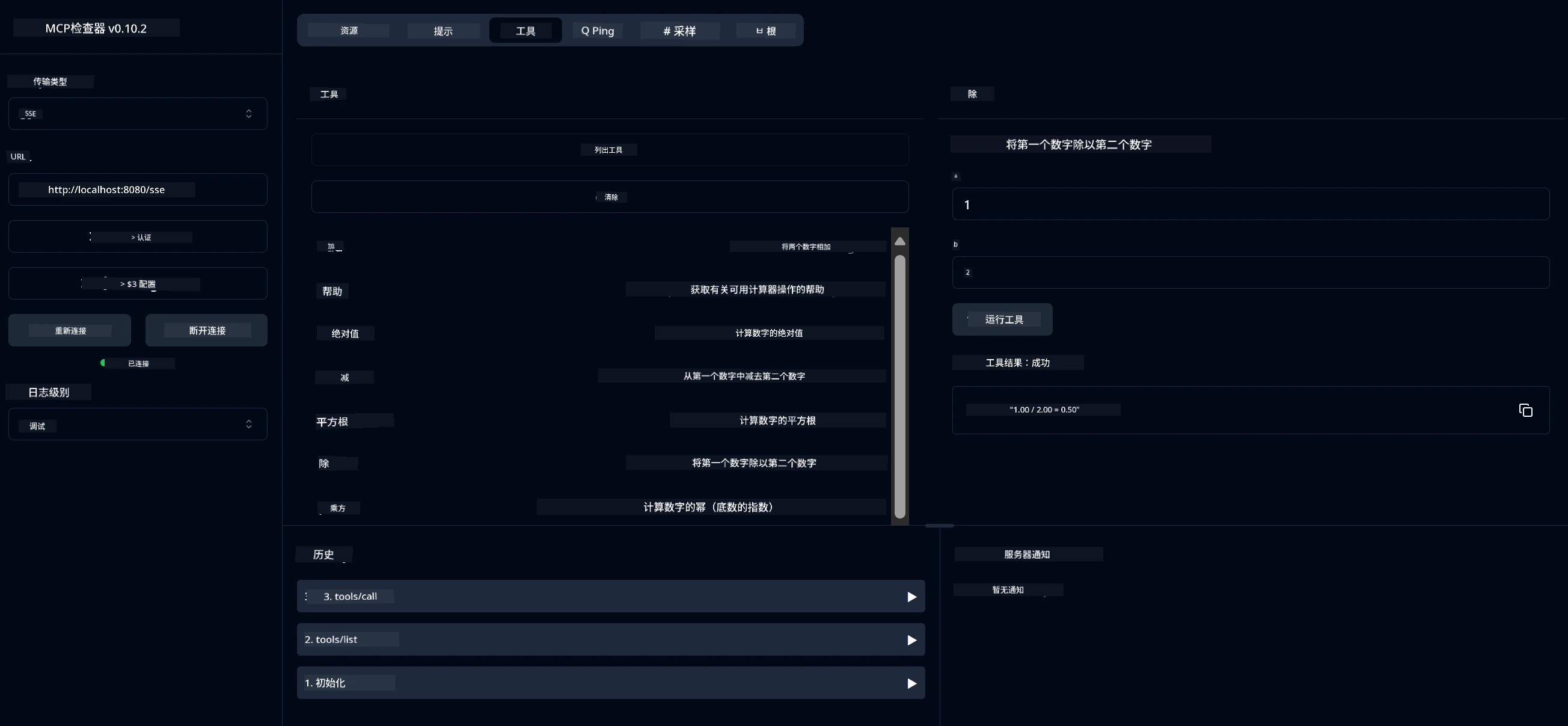
<strong>你现在已连接到服务器</strong>
**Java 服务器测试部分现在完成**
下一部分是关于与服务器交互。
你应该看到以下用户界面:
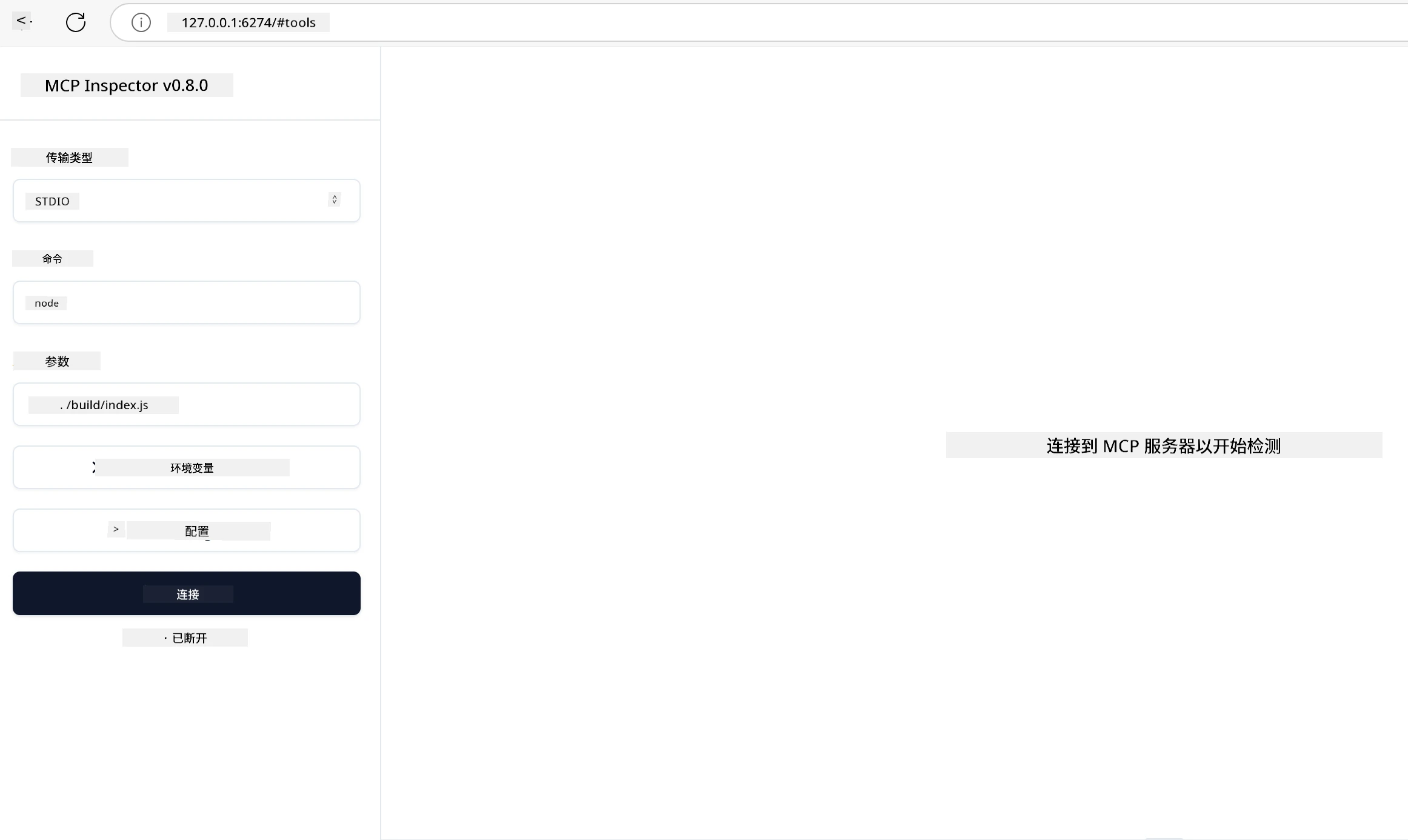
1. 通过选择连接按钮连接到服务器
一旦你连接到服务器,你现在应该看到:

1. 选择“工具”中的“listTools”,你应该看到“Add”出现,选择“Add”并填写参数值。
你应该看到以下响应,即“add”工具的结果:
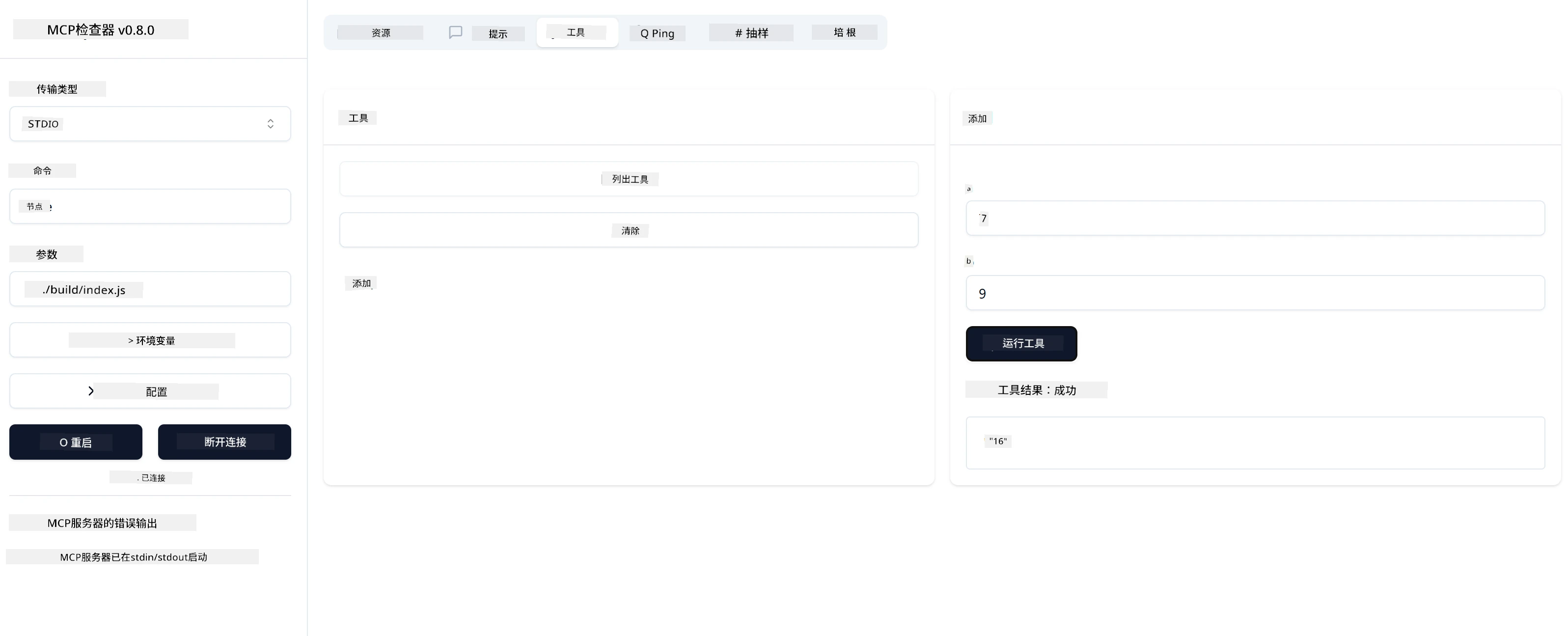
恭喜,你成功创建并运行了你第一个服务器!
#### Rust
要使用 MCP Inspector CLI 运行 Rust 服务器,请使用以下命令:
```sh
npx @modelcontextprotocol/inspector cargo run --cli --method tools/call --tool-name add --tool-arg a=1 b=2
```
### 官方 SDK
MCP 提供多种语言的官方 SDK:
- [C# SDK](https://github.com/modelcontextprotocol/csharp-sdk) - 与 Microsoft 共同维护
- [Java SDK](https://github.com/modelcontextprotocol/java-sdk) - 与 Spring AI 共同维护
- [TypeScript SDK](https://github.com/modelcontextprotocol/typescript-sdk) - 官方 TypeScript 实现
- [Python SDK](https://github.com/modelcontextprotocol/python-sdk) - 官方 Python 实现
- [Kotlin SDK](https://github.com/modelcontextprotocol/kotlin-sdk) - 官方 Kotlin 实现
- [Swift SDK](https://github.com/modelcontextprotocol/swift-sdk) - 与 Loopwork AI 共同维护
- [Rust SDK](https://github.com/modelcontextprotocol/rust-sdk) - 官方 Rust 实现
## 关键要点
- 使用针对特定语言的 SDK,搭建 MCP 开发环境非常简单
- 构建 MCP 服务器涉及创建并注册带有明确模式的工具
- 测试和调试对于可靠的 MCP 实现至关重要
## 示例
- [Java 计算器](https://github.com/microsoft/mcp-for-beginners/blob/2f43408b764326df5fc928984c6dd7db2b8fb63e/translations/zh-CN/03-GettingStarted/samples/java/calculator/README.md)
- [.Net 计算器](https://github.com/microsoft/mcp-for-beginners/blob/2f43408b764326df5fc928984c6dd7db2b8fb63e/03-GettingStarted/samples/csharp)
- [JavaScript 计算器](https://github.com/microsoft/mcp-for-beginners/blob/2f43408b764326df5fc928984c6dd7db2b8fb63e/translations/zh-CN/03-GettingStarted/samples/javascript/README.md)
- [TypeScript 计算器](https://github.com/microsoft/mcp-for-beginners/blob/2f43408b764326df5fc928984c6dd7db2b8fb63e/translations/zh-CN/03-GettingStarted/samples/typescript/README.md)
- [Python 计算器](https://github.com/microsoft/mcp-for-beginners/blob/2f43408b764326df5fc928984c6dd7db2b8fb63e/03-GettingStarted/samples/python)
- [Rust 计算器](https://github.com/microsoft/mcp-for-beginners/blob/2f43408b764326df5fc928984c6dd7db2b8fb63e/03-GettingStarted/samples/rust)
## 任务
用你选择的工具创建一个简单的 MCP 服务器:
1. 用你喜欢的语言实现该工具(.NET、Java、Python、TypeScript 或 Rust)。
2. 定义输入参数和返回值。
3. 运行检查器工具确保服务器按预期工作。
4. 使用各种输入测试该实现。
## 解决方案
[Solution](https://github.com/microsoft/mcp-for-beginners/blob/2f43408b764326df5fc928984c6dd7db2b8fb63e/translations/zh-CN/03-GettingStarted/01-first-server/solution/README.md)
## 额外资源
- [使用 Model Context Protocol 在 Azure 上构建代理](https://learn.microsoft.com/azure/developer/ai/intro-agents-mcp)
- [使用 Azure Container Apps 远程 MCP(Node.js/TypeScript/JavaScript)](https://learn.microsoft.com/samples/azure-samples/mcp-container-ts/mcp-container-ts/)
- [.NET OpenAI MCP 代理](https://learn.microsoft.com/samples/azure-samples/openai-mcp-agent-dotnet/openai-mcp-agent-dotnet/)
## 接下来
下一步:[MCP 客户端入门](https://github.com/microsoft/mcp-for-beginners/blob/2f43408b764326df5fc928984c6dd7db2b8fb63e/translations/zh-CN/03-GettingStarted/02-client/README.md)
---
<!-- CO-OP TRANSLATOR DISCLAIMER START -->
**免责声明**:
本文档使用AI翻译服务[Co-op Translator](https://github.com/Azure/co-op-translator)进行翻译。尽管我们力求准确,但请注意自动翻译可能包含错误或不准确之处。原始语言版本的文档应被视为权威来源。对于关键信息,建议采用专业人工翻译。我们不对因使用此翻译而引起的任何误解或误释承担责任。
<!-- CO-OP TRANSLATOR DISCLAIMER END -->
---
## 版权与许可
```text
MIT License
Copyright (c) Microsoft Corporation.
Permission is hereby granted, free of charge, to any person obtaining a copy
of this software and associated documentation files (the "Software"), to deal
in the Software without restriction, including without limitation the rights
to use, copy, modify, merge, publish, distribute, sublicense, and/or sell
copies of the Software, and to permit persons to whom the Software is
furnished to do so, subject to the following conditions:
The above copyright notice and this permission notice shall be included in all
copies or substantial portions of the Software.
THE SOFTWARE IS PROVIDED "AS IS", WITHOUT WARRANTY OF ANY KIND, EXPRESS OR
IMPLIED, INCLUDING BUT NOT LIMITED TO THE WARRANTIES OF MERCHANTABILITY,
FITNESS FOR A PARTICULAR PURPOSE AND NONINFRINGEMENT. IN NO EVENT SHALL THE
AUTHORS OR COPYRIGHT HOLDERS BE LIABLE FOR ANY CLAIM, DAMAGES OR OTHER
LIABILITY, WHETHER IN AN ACTION OF CONTRACT, TORT OR OTHERWISE, ARISING FROM,
OUT OF OR IN CONNECTION WITH THE SOFTWARE OR THE USE OR OTHER DEALINGS IN THE
SOFTWARE
```