 AI 智链谷
 问苏一二 ↗
社区交流 ·
工具使用设计模式
开源教程转载|工具使用设计模式。Microsoft 及项目贡献者编写,智链谷平台运营整理。
> 开源教程转载 · 由智链谷平台运营账号整理发布。作者:Microsoft 及项目贡献者。
> [查看原文](https://github.com/microsoft/ai-agents-for-beginners/blob/25b7985f3b2dc37a84f4a7387ccd3c9f0e5b1595/translations/zh-CN/04-tool-use/README.md) · MIT 许可,完整声明见文末。
[](https://youtu.be/vieRiPRx-gI?si=cEZ8ApnT6Sus9rhn)
> _(点击上方图片观看本课视频)_
# 工具使用设计模式
工具很有趣,因为它们让 AI 代理拥有了更广泛的能力范围。代理不再局限于执行一组有限的动作,而是通过添加工具,可以执行更广泛的操作。本章将介绍工具使用设计模式,阐述 AI 代理如何利用特定工具来实现其目标。
## 引言
在本课中,我们将解答以下问题:
- 什么是工具使用设计模式?
- 它适用的场景有哪些?
- 实现该设计模式需要哪些要素或构建模块?
- 在使用工具使用设计模式构建可信 AI 代理时有哪些特别的注意事项?
## 学习目标
完成本课后,你将能够:
- 定义工具使用设计模式及其目的。
- 识别工具使用设计模式适用的使用场景。
- 了解实现该设计模式所需的关键元素。
- 认识确保使用该设计模式的 AI 代理可信度的考虑因素。
## 什么是工具使用设计模式?
<strong>工具使用设计模式</strong>着重于赋予大型语言模型(LLM)与外部工具交互以实现特定目标的能力。工具是代理可以执行的代码,用以完成操作。工具可以是简单的函数,比如计算器,或是调用第三方服务的 API,如股票价格查询或天气预报。在 AI 代理的语境中,工具设计为由代理执行,以响应<strong>模型生成的函数调用</strong>。
## 它适用于哪些用例?
AI 代理可以利用工具完成复杂任务、获取信息或做出决策。工具使用设计模式常用在需要与外部系统(如数据库、网络服务或代码解释器)动态交互的场景。该功能适用于多种用例,包括:
- **动态信息检索:** 代理可以查询外部 API 或数据库以获取最新数据(例如,查询 SQLite 数据库进行数据分析、获取股票价格或天气信息)。
- **代码执行与解释:** 代理可以执行代码或脚本来解决数学问题、生成报告或进行模拟。
- **工作流自动化:** 通过集成任务调度器、邮件服务或数据流水线等工具,自动化重复或多步骤的工作流程。
- **客户支持:** 代理可以与 CRM 系统、票务平台或知识库交互以解决用户查询。
- **内容生成与编辑:** 代理可以利用语法检查器、文本摘要工具或内容安全评估器等工具协助内容创作。
## 实现工具使用设计模式所需的元素/构建块有哪些?
这些构建块使 AI 代理能够执行多种任务。让我们看看实现工具使用设计模式所需的关键元素:
- **函数/工具 Schema**:对可用工具的详细定义,包括函数名、用途、必需参数和预期输出。这些 Schema 使 LLM 理解有哪些工具以及如何构造有效请求。
- <strong>函数执行逻辑</strong>:管理基于用户意图和对话上下文何时以及如何调用工具。可能包含规划模块、路由机制或决定工具使用的条件流程。
- <strong>消息处理系统</strong>:管理用户输入、LLM 响应、工具调用及工具输出之间对话流程的组件。
- <strong>工具集成框架</strong>:连接代理与各种工具的基础设施,无论是简单函数还是复杂外部服务。
- <strong>错误处理与验证</strong>:处理工具执行失败、验证参数及管理意外响应的机制。
- <strong>状态管理</strong>:跟踪对话上下文、之前的工具交互及持久数据,确保多轮交互的一致性。
接下来,让我们详细了解函数/工具调用。
### 函数/工具调用
函数调用是让大型语言模型(LLM)与工具交互的主要方式。你会发现“函数”和“工具”常被互换使用,因为“函数”(可重用的代码块)即是代理用来执行任务的“工具”。为了调用函数代码,LLM 必须将用户请求与函数描述进行匹配。为此,将包含所有可用函数描述的 Schema 发送给 LLM。LLM 然后选择最合适的函数,返回函数名称及参数。所选函数被调用,其响应返回给 LLM,LLM 利用这些信息回应用户请求。
为了实现代理的函数调用,开发者需要:
1. 支持函数调用的 LLM 模型
2. 包含函数描述的 Schema
3. 为每个描述的函数编写代码
让我们用获取某城市当前时间的例子说明:
1. **初始化支持函数调用的 LLM:**
并非所有模型都支持函数调用,因此需要确认使用的 LLM 是否支持。<a href="https://learn.microsoft.com/azure/ai-services/openai/how-to/function-calling" target="_blank">Azure OpenAI</a> 支持函数调用。我们可以通过调用 Azure OpenAI **Responses API**(稳定的 `/openai/v1/` 端点,无需 `api_version`)来启动 OpenAI 客户端。
```python
# 初始化用于 Azure OpenAI 的 OpenAI 客户端(响应 API,v1 端点)
client = OpenAI(
base_url=f"{os.environ['AZURE_OPENAI_ENDPOINT'].rstrip('/')}/openai/v1/",
api_key=os.environ["AZURE_OPENAI_API_KEY"],
)
deployment_name = os.environ["AZURE_OPENAI_DEPLOYMENT"]
```
1. **创建函数 Schema:**
接下来定义一个 JSON Schema,包含函数名称、功能描述以及函数参数的名称和说明。
然后将该 Schema 与请求查询旧金山时间的用户请求一起传递给之前创建的客户端。重要的是,返回的是<strong>工具调用</strong>,而<strong>非问题的最终答案</strong>。如前所述,LLM 返回为任务选中的函数名称和将传递给它的参数。
```python
# 模型读取的函数描述(响应 API 扁平工具格式)
tools = [
{
"type": "function",
"name": "get_current_time",
"description": "Get the current time in a given location",
"parameters": {
"type": "object",
"properties": {
"location": {
"type": "string",
"description": "The city name, e.g. San Francisco",
},
},
"required": ["location"],
},
}
]
```
```python
# 初始用户消息
messages = [{"role": "user", "content": "What's the current time in San Francisco"}]
# 第一次 API 调用:要求模型使用该功能
response = client.responses.create(
model=deployment_name,
input=messages,
tools=tools,
tool_choice="auto",
store=False,
)
# Responses API 在 response.output 中返回工具调用作为 function_call 项。
# 将它们附加到对话中,以便模型在下一轮有完整的上下文。
messages += response.output
print("Model's response:")
print(response.output)
```
```bash
Model's response:
[ResponseFunctionToolCall(arguments='{"location":"San Francisco"}', call_id='call_pOsKdUlqvdyttYB67MOj434b', name='get_current_time', type='function_call')]
```
1. **执行任务所需的函数代码:**
既然 LLM 已选定需调用的函数,需要实现并执行完成任务的代码。
我们用 Python 实现获取当前时间的代码。同样还需要编写代码来从 response_message 中提取函数名和参数,以获得最终结果。
```python
def get_current_time(location):
"""Get the current time for a given location"""
print(f"get_current_time called with location: {location}")
location_lower = location.lower()
for key, timezone in TIMEZONE_DATA.items():
if key in location_lower:
print(f"Timezone found for {key}")
current_time = datetime.now(ZoneInfo(timezone)).strftime("%I:%M %p")
return json.dumps({
"location": location,
"current_time": current_time
})
print(f"No timezone data found for {location_lower}")
return json.dumps({"location": location, "current_time": "unknown"})
```
```python
# 处理函数调用
tool_calls = [item for item in response.output if item.type == "function_call"]
if tool_calls:
for tool_call in tool_calls:
if tool_call.name == "get_current_time":
function_args = json.loads(tool_call.arguments)
time_response = get_current_time(
location=function_args.get("location")
)
# 将工具结果作为 function_call_output 项返回
messages.append({
"type": "function_call_output",
"call_id": tool_call.call_id,
"output": time_response,
})
else:
print("No tool calls were made by the model.")
# 第二次 API 调用:从模型获取最终响应
final_response = client.responses.create(
model=deployment_name,
input=messages,
tools=tools,
store=False,
)
return final_response.output_text
```
```bash
get_current_time called with location: San Francisco
Timezone found for san francisco
The current time in San Francisco is 09:24 AM.
```
函数调用是大多数(如果不是全部)代理工具使用设计的核心,然而从零实现有时颇具挑战。
正如我们在[课程 2](https://github.com/microsoft/ai-agents-for-beginners/blob/25b7985f3b2dc37a84f4a7387ccd3c9f0e5b1595/02-explore-agentic-frameworks)所学,代理框架为我们提供了预构建的构建块以实现工具使用。
## 使用代理框架的工具使用示例
以下是使用不同代理框架实现工具使用设计模式的一些示例:
### Microsoft 代理框架
<a href="https://learn.microsoft.com/azure/ai-services/agents/overview" target="_blank">Microsoft 代理框架</a> 是用于构建 AI 代理的开源 AI 框架。它通过允许你用 `@tool` 装饰器将工具定义为 Python 函数,简化了函数调用的过程。该框架处理模型与代码之间的双向通信。同时,`FoundryChatClient` 还提供了预构建工具,如文件搜索和代码解释器。
下图说明了 Microsoft 代理框架中函数调用的流程:
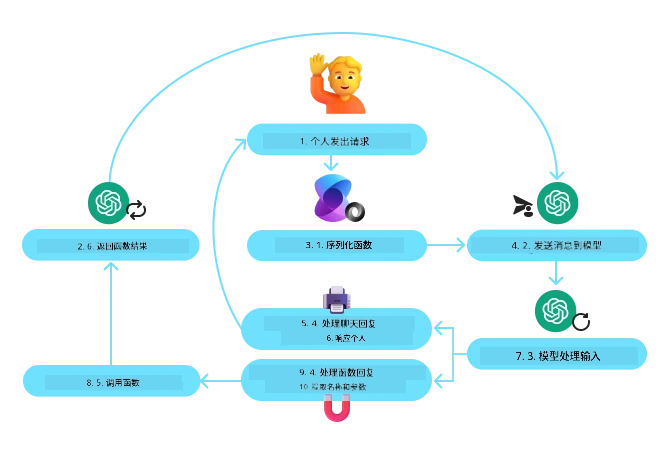
在 Microsoft 代理框架中,工具定义为被装饰的函数。我们可以将之前看到的 `get_current_time` 函数用 `@tool` 装饰器转换为工具。框架会自动序列化该函数及其参数,创建发送给 LLM 的 Schema。
```python
import os
from agent_framework import tool
from agent_framework.foundry import FoundryChatClient
from azure.identity import AzureCliCredential
@tool(approval_mode="never_require")
def get_current_time(location: str) -> str:
"""Get the current time for a given location"""
...
# 创建客户端
provider = FoundryChatClient(
project_endpoint=os.environ["AZURE_AI_PROJECT_ENDPOINT"],
model=os.environ["AZURE_AI_MODEL_DEPLOYMENT_NAME"],
credential=AzureCliCredential(),
)
# 创建一个代理并使用该工具运行
agent = provider.as_agent(name="TimeAgent", instructions="Use available tools to answer questions.", tools=get_current_time)
response = await agent.run("What time is it?")
```
### Microsoft Foundry 代理服务
<a href="https://learn.microsoft.com/azure/ai-services/agents/overview" target="_blank">Microsoft Foundry 代理服务</a> 是一个较新的代理框架,旨在帮助开发者安全地构建、部署和扩展高质量且可扩展的 AI 代理,而无需管理底层计算与存储资源。对企业应用尤其有用,因为它是完全托管的服务,具备企业级安全性。
与直接使用 LLM API 开发相比,Microsoft Foundry 代理服务提供了以下优势:
- 自动工具调用—无需解析工具调用、调用工具及处理响应;所有这些操作均在服务器端完成
- 安全管理数据—无需自行管理对话状态,可依赖线程保存所有所需信息
- 开箱即用的工具—可用于交互数据源的工具,例如 Bing、Azure AI 搜索和 Azure Functions
Microsoft Foundry 代理服务中的工具可分为两类:
1. 知识工具:
- <a href="https://learn.microsoft.com/azure/ai-services/agents/how-to/tools/bing-grounding?tabs=python&pivots=overview" target="_blank">基于 Bing 搜索的落地工具</a>
- <a href="https://learn.microsoft.com/azure/ai-services/agents/how-to/tools/file-search?tabs=python&pivots=overview" target="_blank">文件搜索</a>
- <a href="https://learn.microsoft.com/azure/ai-services/agents/how-to/tools/azure-ai-search?tabs=azurecli%2Cpython&pivots=overview-azure-ai-search" target="_blank">Azure AI 搜索</a>
2. 操作工具:
- <a href="https://learn.microsoft.com/azure/ai-services/agents/how-to/tools/function-calling?tabs=python&pivots=overview" target="_blank">函数调用</a>
- <a href="https://learn.microsoft.com/azure/ai-services/agents/how-to/tools/code-interpreter?tabs=python&pivots=overview" target="_blank">代码解释器</a>
- <a href="https://learn.microsoft.com/azure/ai-services/agents/how-to/tools/openapi-spec?tabs=python&pivots=overview" target="_blank">OpenAPI 定义的工具</a>
- <a href="https://learn.microsoft.com/azure/ai-services/agents/how-to/tools/azure-functions?pivots=overview" target="_blank">Azure Functions</a>
该代理服务允许我们将这些工具作为 `工具集` 一起使用。同时它利用 `线程` 来跟踪特定对话的消息历史。
假设你是 Contoso 公司的销售代理,想开发一个能回答销售数据相关问题的对话代理。
下图展示了如何使用 Microsoft Foundry 代理服务分析销售数据:
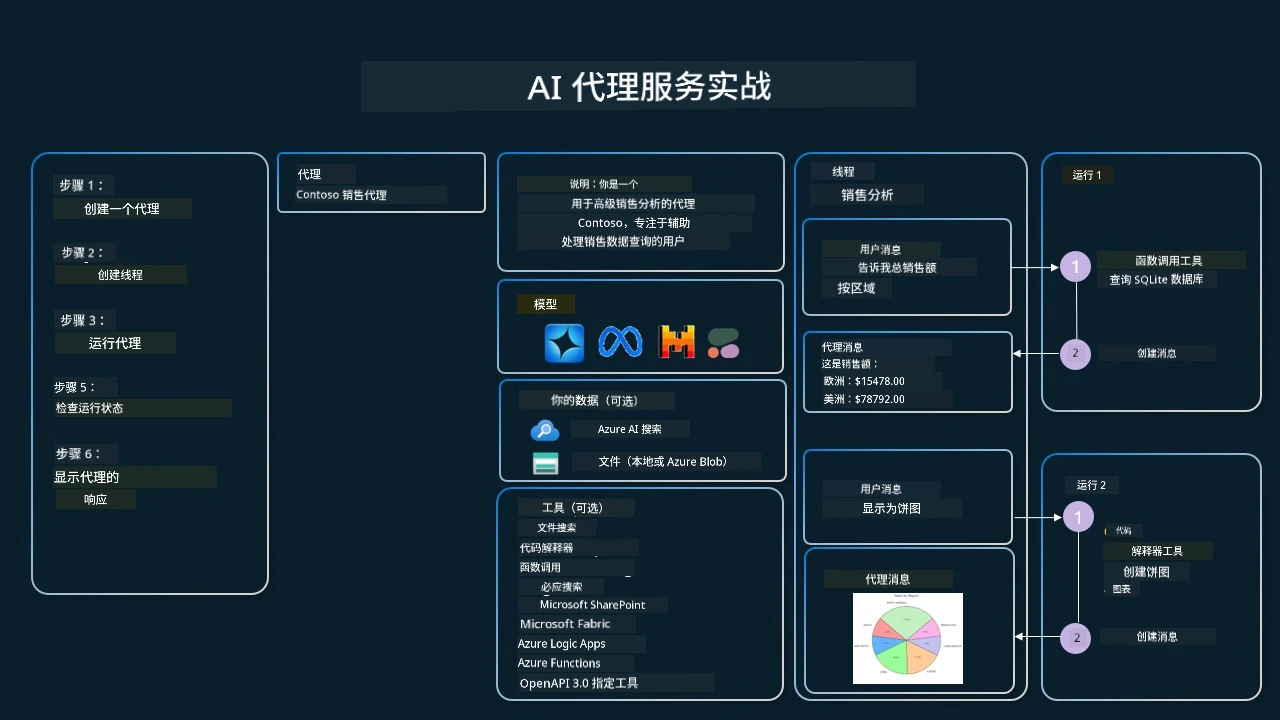
要使用服务中的任何工具,我们可以创建客户端并定义单个工具或工具集。下面的 Python 代码演示了这一实现。LLM 将能够查看工具集,并根据用户请求决定是使用用户创建的函数 `fetch_sales_data_using_sqlite_query` 还是预构建的代码解释器。
```python
import os
from azure.ai.projects import AIProjectClient
from azure.identity import DefaultAzureCredential
from fetch_sales_data_functions import fetch_sales_data_using_sqlite_query # 可以在 fetch_sales_data_functions.py 文件中找到的 fetch_sales_data_using_sqlite_query 函数。
from azure.ai.projects.models import ToolSet, FunctionTool, CodeInterpreterTool
project_client = AIProjectClient.from_connection_string(
credential=DefaultAzureCredential(),
conn_str=os.environ["PROJECT_CONNECTION_STRING"],
)
# 初始化工具集
toolset = ToolSet()
# 使用 fetch_sales_data_using_sqlite_query 函数初始化函数调用代理,并将其添加到工具集中
fetch_data_function = FunctionTool(fetch_sales_data_using_sqlite_query)
toolset.add(fetch_data_function)
# 初始化代码解释器工具并将其添加到工具集中。
code_interpreter = CodeInterpreterTool()toolset.add(code_interpreter)
agent = project_client.agents.create_agent(
model="gpt-5-mini", name="my-agent", instructions="You are helpful agent",
toolset=toolset
)
```
## 使用工具使用设计模式构建可信 AI 代理的特别注意事项?
一个常见的安全问题是 LLM 动态生成的 SQL,特别是存在 SQL 注入或恶意操作(如删除或篡改数据库)的风险。虽然这些担忧合理,但通过正确配置数据库访问权限可以有效避免。对大多数数据库来说,这意味着配置为只读。对于 PostgreSQL 或 Azure SQL 等数据库服务,应为应用分配只读(SELECT)角色。
在安全环境中运行应用进一步增强了保护。在企业场景中,数据通常从操作系统中提取并转换到只读的数据库或数据仓库,并采用友好的 Schema。这保证了数据安全、性能及可访问性的优化,并且应用权限仅限于只读。
## 示例代码
- Python: [Agent Framework](https://github.com/microsoft/ai-agents-for-beginners/blob/25b7985f3b2dc37a84f4a7387ccd3c9f0e5b1595/translations/zh-CN/04-tool-use/code_samples/04-python-agent-framework.ipynb)
- .NET: [Agent Framework](https://github.com/microsoft/ai-agents-for-beginners/blob/25b7985f3b2dc37a84f4a7387ccd3c9f0e5b1595/translations/zh-CN/04-tool-use/code_samples/04-dotnet-agent-framework.md)
## 对工具使用设计模式还有疑问吗?
加入 [Microsoft Foundry Discord](https://discord.com/invite/ATgtXmAS5D) 与其他学习者交流,参加答疑时间,解答你的 AI 代理相关问题。
## 额外资源
- <a href="https://microsoft.github.io/build-your-first-agent-with-azure-ai-agent-service-workshop/" target="_blank">Azure AI Agents Service 工作坊</a>
- <a href="https://github.com/Azure-Samples/contoso-creative-writer/tree/main/docs/workshop" target="_blank">Contoso 创意写作多代理工作坊</a>
- <a href="https://learn.microsoft.com/azure/ai-services/agents/overview" target="_blank">Microsoft 代理框架概览</a>
## 这个代理的冒烟测试(可选)
在学习了如何部署代理(参见[第16课](https://github.com/microsoft/ai-agents-for-beginners/blob/25b7985f3b2dc37a84f4a7387ccd3c9f0e5b1595/translations/zh-CN/16-deploying-scalable-agents/README.md))后,你可以用[`tests/lesson-04-smoke-tests.json`](https://github.com/microsoft/ai-agents-for-beginners/blob/25b7985f3b2dc37a84f4a7387ccd3c9f0e5b1595/tests/lesson-04-smoke-tests.json)对本课的`TravelToolAgent`进行冒烟测试(它是否仍然调用其工具并作出回答?)。有关如何运行它,请参见[`tests/README.md`](https://github.com/microsoft/ai-agents-for-beginners/blob/25b7985f3b2dc37a84f4a7387ccd3c9f0e5b1595/translations/zh-CN/tests/README.md)。
## 上一课
[理解代理设计模式](https://github.com/microsoft/ai-agents-for-beginners/blob/25b7985f3b2dc37a84f4a7387ccd3c9f0e5b1595/translations/zh-CN/03-agentic-design-patterns/README.md)
## 下一课
[代理式RAG](https://github.com/microsoft/ai-agents-for-beginners/blob/25b7985f3b2dc37a84f4a7387ccd3c9f0e5b1595/translations/zh-CN/05-agentic-rag/README.md)
---
<!-- CO-OP TRANSLATOR DISCLAIMER START -->
**免责声明**:
本文件由 AI 翻译服务 [Co-op Translator](https://github.com/Azure/co-op-translator) 翻译完成。尽管我们力求准确,但请注意,自动翻译可能包含错误或不准确之处。原始语言版文件应视为权威来源。对于重要信息,建议使用专业人工翻译。我们对因使用本翻译而产生的任何误解或误释不承担责任。
<!-- CO-OP TRANSLATOR DISCLAIMER END -->
---
## 版权与许可
```text
MIT License
Copyright (c) Microsoft Corporation.
Permission is hereby granted, free of charge, to any person obtaining a copy
of this software and associated documentation files (the "Software"), to deal
in the Software without restriction, including without limitation the rights
to use, copy, modify, merge, publish, distribute, sublicense, and/or sell
copies of the Software, and to permit persons to whom the Software is
furnished to do so, subject to the following conditions:
The above copyright notice and this permission notice shall be included in all
copies or substantial portions of the Software.
THE SOFTWARE IS PROVIDED "AS IS", WITHOUT WARRANTY OF ANY KIND, EXPRESS OR
IMPLIED, INCLUDING BUT NOT LIMITED TO THE WARRANTIES OF MERCHANTABILITY,
FITNESS FOR A PARTICULAR PURPOSE AND NONINFRINGEMENT. IN NO EVENT SHALL THE
AUTHORS OR COPYRIGHT HOLDERS BE LIABLE FOR ANY CLAIM, DAMAGES OR OTHER
LIABILITY, WHETHER IN AN ACTION OF CONTRACT, TORT OR OTHERWISE, ARISING FROM,
OUT OF OR IN CONNECTION WITH THE SOFTWARE OR THE USE OR OTHER DEALINGS IN THE
SOFTWARE
```